I know, I know, I’ve been very silent… I’m lacking the time and the mood to post and I’ve been playing some great games. Anyway, check out this new software from [tag]Sony[/tag] for the [tag]PSP[/tag] – [tag]PSP Media Manager[/tag]. Coming this month, this is supposed to be the ultimate media manager for the PSP.
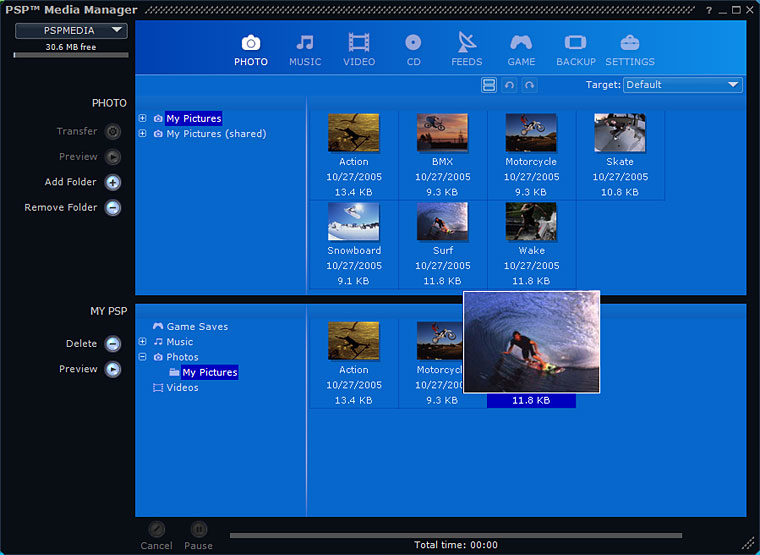
PSP ([tag]PlayStation Portable[/tag]) Media Manager
Features:
General
* Clean, intuitive interface
* Extensive video, audio, and image support
* Automated file conversion
* Easy drag-and-drop transfer to PSP system
* Status bar indicator displays available space on Memory Stick Duo media
* Visible progress indicator
* Simultaneous transfer of multiple items to the PSP systemVideo
* Video support for .mp4, .avi, .mpg, .mov, .wmv, and more
* Customizable target encoding settings
* High-quality Sony AVC/AAC video encodingPowered by GracenoteMusic
* Audio support for .mp3, .wav, .wma, .m4a, and other popular formats
* Gracenote CD album identification
* Customizable bitrate options for encodingPhotos
* Image support for .bmp, .jpg, .gif, .png, .tif
* Thumbnail preview
* Easy conversion of photos
* One-click transfer of PSP-formatted magazinesFeeds
* Built-in directory of popular RSS feeds
* Video blog and podcast delivery via RSS 2.0 with enclosures
* One-click check for new feeds
* Import feed lists (OPML format) from other RSS aggregators
* Export feed lists for use in other RSS aggregatorsGame Saves
* Easy game save management and backup
* Move game saves between Memory Stick Duo mediaBackup Mode
* Back up and restore files between your computer and PSP system
* Automated backup of files from your PSP system to your PC
The negative side is that it won’t be free (BAD SONY!!!), but it looks quite cool. Maybe worth investing a few Euros…

Leave a Reply