Sony Media Software – PSP Media Manager

·

I know, I know, I’ve been very silent… I’m lacking the time and the mood to post and I’ve been playing some great games. Anyway, check out this new software from [tag]Sony[/tag] for the [tag]PSP[/tag] – [tag]PSP Media Manager[/tag]. Coming this month, this is supposed to be the ultimate media manager for the PSP.
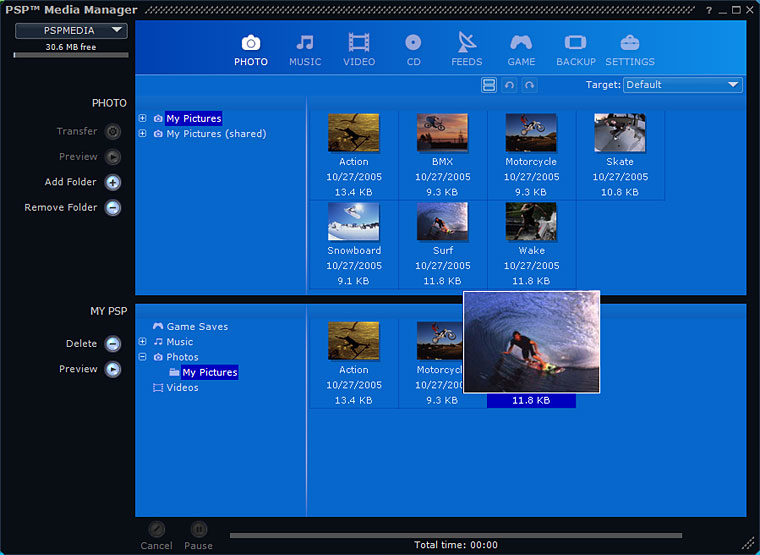
PSP ([tag]PlayStation Portable[/tag]) Media Manager

Features:

General

* Clean, intuitive interface
* Extensive video, audio, and image support
* Automated file conversion
* Easy drag-and-drop transfer to PSP system
* Status bar indicator displays available space on Memory Stick Duo media
* Visible progress indicator
* Simultaneous transfer of multiple items to the PSP system

Video

* Video support for .mp4, .avi, .mpg, .mov, .wmv, and more
* Customizable target encoding settings
* High-quality Sony AVC/AAC video encoding

Powered by GracenoteMusic

* Audio support for .mp3, .wav, .wma, .m4a, and other popular formats
* Gracenote CD album identification
* Customizable bitrate options for encoding

Photos

* Image support for .bmp, .jpg, .gif, .png, .tif
* Thumbnail preview
* Easy conversion of photos
* One-click transfer of PSP-formatted magazines

Feeds

* Built-in directory of popular RSS feeds
* Video blog and podcast delivery via RSS 2.0 with enclosures
* One-click check for new feeds
* Import feed lists (OPML format) from other RSS aggregators
* Export feed lists for use in other RSS aggregators

Game Saves

* Easy game save management and backup
* Move game saves between Memory Stick Duo media

Backup Mode

* Back up and restore files between your computer and PSP system
* Automated backup of files from your PSP system to your PC

The negative side is that it won’t be free (BAD SONY!!!), but it looks quite cool. Maybe worth investing a few Euros…

Comments

One response to “Sony Media Software – PSP Media Manager”

  1. Steve Avatar

    If you, like myself, think that this program should come bundled with the purchase of a PSP, send Sony a message to let them know about it.

    To contact their customer service department, go to the following site:
    http://www.us.playstation.com/contactus.aspx?id=form

    Click on the ‘Consumer Services’ link under ‘Support/Consumer Services’. From the ‘Category’ drop-menu at the bottom, choose ‘Other’under the ‘Corporate’ heading. Click on ‘Continue’, and then submit your comment. I sent the following message yesterday:

    “I just purchased a PSP, and I am disappointed to learn that I will have to pay an additional fee if I want the software that you have designed to manage it. If Sony intends to compete in the multimedia market with other companies such as Apple, which provides it’s iPod management software for free, the PSP Media Manager should come with the purchase of the PSP itself. The fact that it does not suggests a short-sighted marketing strategy which disrespects customers who have already paid a significant amount of money for your product.”

    I received the following response today:

    “We value your input and appreciate you bringing this to our attention. Please rest assured that we will convey your feedback to Sony Computer Entertainment America’s (”SCEA”) appropriate management.”

    It is unlikely that much will come of my own individual complaint, but Sony may decide to change its policy if enough people voice their disapproval.

Leave a Reply

Your email address will not be published. Required fields are marked *

This site uses Akismet to reduce spam. Learn how your comment data is processed.