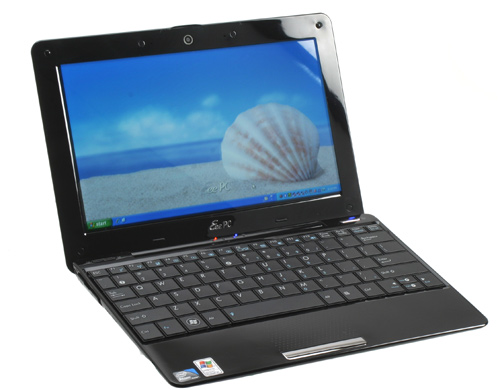
Until a few weeks ago, the netbook market / scene was a bit of a unknown thing to me. I lacked the information mainly because I was never attracted to small notebooks and netbooks felt into that “class”.
What made me change my mind? Well, my wife often mentioned she would like to have a smaller notebook than her 15.4″ Dell to take to school. That and a trip we made this vacation 🙂 I needed to take a computer and my 17″ Macbook Pro was out of the question since I would need it to check maps, info and e-mail on the go. So, a few days before this trip we went to take a look on the local Vobis / Worten and evaluated the offer.
The Asus EEE PC 1008HA was indeed the most balanced of them all, taking in perspective what we both needed: a light netbook. I was still split between the Asus and an Aspire One, but the Asus had Wifi N and a bigger hard drive, not to mention the screen quality that is amazing.
But enought chit chat, here’s my take and notes on the Asus 1008HA:
Pros
- Very light, only weights 1.1 Kg
- Stylish design, similar to a MacBook Air
- 160Gb HD
- WiFi Draft N and Bluetooth v2.1
- Functional Keyboard
- Multitouch Touchpad
- 6 hours unplugged computing with Super Hybrid Engine (Asus’s energy managment app)
Cons
- Plastic sheel feels cheap and fragile in some areas
- Windows XP bundle
- Non Removable Battery
- No easy access to RAM and HD
- 1.1 Mpixel Webcam has a crappy framerate
The Netbook behaved very well on the go, the battery time is amazing and it seems to last forever, and it’s a good thing because there’s no way to use a second battery. Due to the Seashell design, Asus limited all the expansion on the machine. The battery is not user removable neither is the RAM or HD. To replace these three components you need to disassemble the machine.
One of my frustrations was that there was no bundle with Linux, Asus seems to be kissing Microsoft’s ass again with Netbooks, so the first thing I did after getting home from the trip was to try to find a decent operating system for the Netbook. The candidates were:
- Windows 7
- Fedora 11
- Jolicloud
- Ubuntu Netbook Remix
Windows 7 installed very well, the only problem I had was with the ACPI and graphics card. Flashing the 1008HA with the latest bios solved the latest problem, and the other one was solved with a hacked ACPI driver I found on the web. There are still no Asus drivers for Windows 7 but the ones the system installs work rather well. The problem with 7 is that with a default configuration it ran slower than XP, consuming a hefty 450Mb of RAM without no other application loaded. Oh and it was slow as hell to boot. So, on to the next.
Fedora 11 looked beautiful for the first 5 minutes. It all seemed to work out of the box, even wireless and it booted rather fast from the CD I was using. One of the first problems I noticed was that the it wasn’t optimized for netbooks, Gnome dialog boxes were huge and often the OK / Cancel buttons were offscreen. When I tried to install it to the hard drive it failed afer creating the partitions and exited the installation program, leaving me with a damaged installation. I might try it another time but for now… next!
I was very eager to try Jolicloud but the alpha is still invitation only, and since no one on the Interwebs was kind enought to send me an invite, I only managed to try the OS without the cloud part… It seemed like a heavily modified Ubuntu Netbook Remix. It worked very well out of the box and the eye candy is very cool. Sadly for me the most interesting part of this system is the cloud… so, on to the next one.
Enter Ubuntu Netbook Remix, a netbook oriented Ubuntu, which seems to be the most common base of a boatload of netbook linux distros. I installed UNR 9.04 and guess what? Wireless and Ethernet didn’t work. It was Google time and I finally found this guy’s post on the 1008HA and exactly the same problem I had. Three commands and a reboot and Networking is back, my luck is that I also had an USB Ethernet adpter that UNR immediately recognized. After taking it for a quick spin, it seems I found a suitable OS for this netbook.
Of couse I’m not stoping here, as I’m writing this I’m installing UNR 9.10 Alpha to check if there are some significant improvements over 9.04. After that I’ll probably try another 2 or 3 distros, but I think it will be hard to surpass UNR 9.04. Unfortunately not everything works with UNR as well as it works with Windows XP, since there are no Asus drivers for Linux either. So don’t count with some keyboard combos and the Super Hybrid Engine on Linux, at least for now.
Ending this loooong post: The more I play with this netbook the more I wish that Apple would release a netbook or a smaller version of the Air (still I wouldn’t mind having an Air). I think that once you go Mac it’s hard to look back.
Notes
To get wireless working on UNR 9.04:
sudo apt-get update
Reboot
then:
sudo apt-get upgrade
Reboot
sudo apt-get install linux-backports-modules-jaunty
Reboot only needed after modules installation. (Thanks Tiago!)


Leave a Reply